7 Best T-Shirt Design Software Tools for POD
The best tool depends on the job. Illustrator leads for professional vector control, Inkscape is the free vector pick, Canva and Kittl make layout easier, and Printful or Printify handle product placement. MerchBanao fits AI-first raster artwork. This guide explains where each option works, where it does not, and what to verify before sending a file to print.
#Best t-shirt design software at a glance
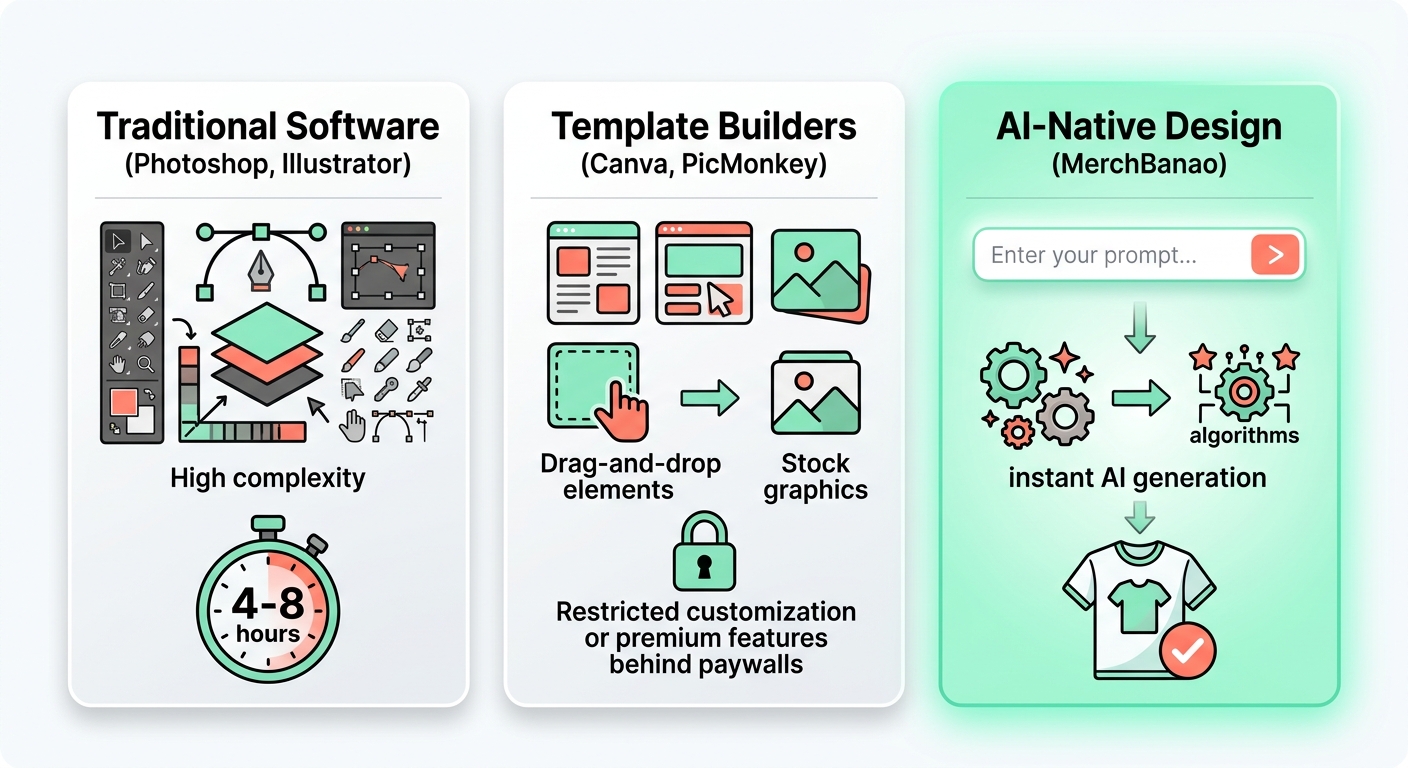
There is no honest universal winner. Adobe Illustrator is the strongest option here for precise vector work. Inkscape covers much of that workflow for free. Canva and Kittl are easier for layout and typography, while Printful and Printify make product placement simpler inside their own fulfilment systems. MerchBanao is the focused choice when you want to generate, edit, preview, and export raster merch artwork in one browser session.
| Tool | Best for | Cost model | Important limitation |
|---|---|---|---|
| Adobe Illustrator | Original vector art and exact path control | Subscription | Longer learning curve |
| Inkscape | Free SVG and vector editing | Free, open source | Desktop workflow; fewer guided assets |
| Canva | Fast layouts with templates and type | Free and paid plans | Library content is licensed, not exclusive |
| Kittl | Display type, badges, and vintage layouts | Free personal tier; paid commercial tiers | Commercial high-res export requires a paid plan |
| Printful Design Maker | Placing art on Printful products | Free with account | Best inside the Printful fulfilment workflow |
| Printify Product Creator | Product layouts, patterns, and Printify mockups | Free with account | Best inside the Printify fulfilment workflow |
| MerchBanao | AI-first merch artwork and PNG preparation | Credit-based | Raster PNG workflow, not full vector drawing |
How we chose: this guide matches each tool's current public documentation to common apparel jobs. It is not a sponsored lab test or a claim that one app produces better art. Product features and licence pages were reviewed on July 25, 2026.
#Best vector t-shirt design software
Adobe Illustrator: best for professional vector control
Illustrator is the sensible pick for logos, badge systems, custom lettering, spot-colour separations, and artwork that must scale without losing edge quality. Adobe describes it as a vector graphics app for logos, icons, typography, illustration, and print. Its current individual plan is a subscription, so the cost makes most sense when you need its path tools and production controls regularly. Check the official Illustrator plan and feature page before buying because regional prices and promotions change.
Inkscape: best free vector editor
Inkscape is free, open-source software for Windows, macOS, and Linux. Its native format is SVG, and the project documents imports and exports including SVG, PDF, EPS, AI, and PNG. It is a strong fit for sellers willing to learn nodes, paths, clipping, and typography without paying a subscription. The trade-off is time: there are fewer guided templates and product-specific shortcuts. See Inkscape's official overview for its current platform and format support.
- Choose vector software for logos, line art, screen-print separations, and artwork you will reuse at many sizes.
- Keep editable SVG, AI, or PDF source files even when the printer asks for a flattened PNG.
- Convert or package fonts only after the wording and licence have been checked.
- Use raster software when the artwork depends on photographs, painted texture, or generated pixels.
#Best template and typography tools for shirts
Canva: best for quick beginner layouts
Canva is useful when the job is arranging text, shapes, uploaded art, and licensed library elements. The licence is the part sellers need to read. Canva permits original designs containing Free or Pro content on merchandise, but it does not permit selling a library asset on its own. Canva also warns that some POD services require copyright ownership rather than a licence to use the content. Read Canva's products-for-sale guidance before using stock elements in a commercial upload.
Kittl: best for display type and badge layouts
Kittl is particularly convenient for warped type, badges, vintage compositions, textures, mockups, and AI-assisted design. The free plan is for personal use and documents exports up to 800 pixels. Kittl's paid Pro plan adds commercial use plus transparent high-resolution PNG, PDF, and SVG export. That plan distinction is easy to miss, so verify the free-plan limits and paid export and commercial terms for the account you use.
#Best free POD product design software
A fulfilment editor is often the shortest route when the artwork already exists and the remaining job is placement. It knows the selected product's print area, available garment colours, and mockup views. It is less useful for building a reusable design system outside that provider.
Printful Design Maker
Printful's free Design Maker combines product placement, text, clipart, and downloadable mockups. It is a practical last-mile tool for a Printful listing. Build detailed original artwork elsewhere, then use Design Maker to position it on the exact blank and inspect the preview.
Printify Product Creator
Printify's Product Creator documents text tools, up to 20 layers per print area, background removal, patterns, an AI image generator, product specifications, and mockups. It is free to use inside Printify. The advantage is product context; the limitation is that your working process is tied to that fulfilment catalogue.
#Best AI-first t-shirt design software workflow
MerchBanao is built for a narrower job than Illustrator or Canva. You describe a merch graphic, generate image variations, place the chosen artwork on a canvas, add editable text, remove the background, preview it on a shirt, and export a 4200 × 4800 pixel PNG. That is useful for raster illustration and fast concept iteration. It is not a substitute for hand-editing vector paths or preparing specialist screen-print separations.
If you are choosing between image models rather than complete design applications, use the separate AI t-shirt model comparison. That page covers generation quality and model behaviour. This software guide covers the wider production stack.
A mixed workflow is often better than brand loyalty. Generate or sketch in one tool, correct the composition in another, and place the final file in the fulfilment provider's product editor. Save source files and record the licence for every font, template, stock element, and generated asset.
- Use MerchBanao when the starting point is a prompt and the required delivery file is a high-resolution PNG.
- Use Illustrator or Inkscape when paths, vectors, separations, or exact reusable brand geometry matter.
- Use Canva or Kittl when editable typography and ready-made layout systems are the main need.
- Finish in Printful or Printify when you need the exact product template, placement, and listing mockup.
#Print-ready file requirements software cannot decide for you
“300 DPI” is not a magic export setting. Pixel dimensions determine how much raster detail exists. Required pixels equal the intended print width or height in inches multiplied by the requested pixels per inch. A 14 × 16 inch print area at 300 pixels per inch needs 4200 × 4800 pixels. Changing a 1000-pixel image's metadata to 300 DPI does not add the missing pixels.
Open the exact product template before designing. Print areas change by blank, size, print provider, and decoration method. Direct-to-garment, direct-to-film, screen print, sublimation, and embroidery do not share one universal file recipe. Printful's print-file preparation guide likewise tells sellers to follow product-specific guidelines rather than one blanket dimension.
Inspect the final file at 100% zoom. Check transparent edges on both light and dark backgrounds, small counters inside letters, thin lines, spelling, and any texture that may turn into isolated ink dots. Then order a sample before spending on advertising.
- Canvas size matches the exact product template.
- Raster art contains enough real pixels at the intended print size.
- The background is genuinely transparent when the product requires it.
- Fonts and artwork have documented commercial permission.
- Fine lines and small type are suitable for the chosen print method.
- A sample confirms placement, colour, detail, and garment choice.
#How to choose t-shirt design software
- Name the job. Separate drawing, layout, image generation, print preparation, placement, and mockups.
- Choose the required source format. Pick vector software for reusable paths and raster software for pixel-based art.
- Read the commercial terms. Check the plan, every library asset, fonts, and AI-output terms.
- Test the real export. Download a file and inspect its pixel dimensions, transparency, editability, and colour profile.
- Use the provider template. Place the final artwork against the specific product's safe and bleed areas.
- Order one sample. Software previews cannot reproduce every ink, fabric, pretreatment, or printer variation.
Start with the simplest tool that preserves the control you actually need. A beginner making a two-colour slogan does not need the same stack as a studio preparing separations for a 500-unit screen-print run. The right t-shirt design software is the one that produces a lawful, editable source and a file your selected printer can use.
How It Works
A browser workflow for an artwork draft
Prompt it
Describe your vision in text.
Refine it
Tweak colors, layout and text.
Export and check
Download a 4200 × 4800 PNG, then check the product template.
Frequently Asked Questions
Everything you need to know about t-shirt design software
Related Tools & Guides
Everything you need to design, launch & sell
Ready to turn this guide into
a print-ready design?
Generate, edit, preview, and export in one browser session