Remove Background from T-Shirt Designs
Remove a design background inside the same workflow used to generate, edit, and preview the shirt artwork. MerchBanao exports a 4200 × 4800 transparent PNG; inspect edges on light and dark backgrounds and check the target product template before upload.
#Why Background Removal is Essential for Print-on-Demand
Every major print-on-demand platform — Merch by Amazon, Redbubble, Printify, Printful — requires designs to be uploaded as transparent PNG files. If your design has a white or colored background, the print will include that background as a solid rectangle on the shirt.
This is the single most common mistake new POD sellers make: generating a design but not removing the background before uploading. The result is a t-shirt design that looks like a printed sticker rather than a graphic integrated into the fabric.
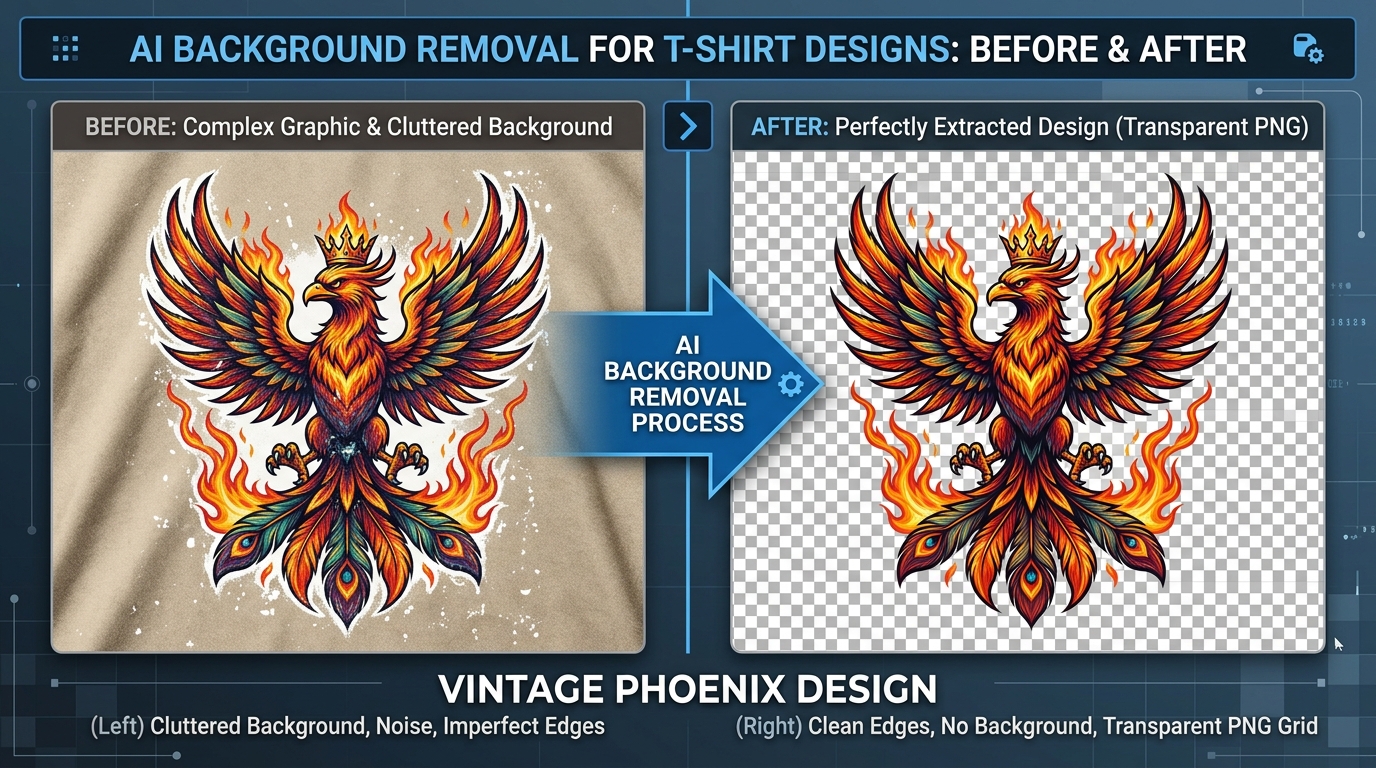
Proper background removal creates a transparent PNG where only the actual artwork remains. When placed on a t-shirt, it looks like the design is directly on the fabric — the professional result buyers expect.
#How MerchBanao's Background Removal Works
MerchBanao uses a dual-model AI background removal system for superior edge quality:
- Bria RMBG 2.0 — specialized in isolating product and apparel graphics from backgrounds
- BiRefNet — excels at fine edge detection, particularly on complex textures like fur, hair, and feathers
The two models are used in combination: Bria handles the broad separation of foreground from background, while BiRefNet refines edge quality. The result is significantly cleaner than single-model tools like the standard Remove.bg API.
After removal, inspect the edges on both light and dark backgrounds. MerchBanao exports a transparent 4200 × 4800 PNG; compare it with the exact product template before upload.
- Handles complex edges — fur, feathers, hair, intricate patterns
- Preserves fine details — thin lines, small text, subtle gradients
- No white fringe / halo artifacts around the design edge
- Works on AI-generated AND uploaded design files
- 4200 × 4800 transparent PNG output — verify the product template
- One-click removal — no masking, painting, or manual editing
#Common Background Removal Challenges in Merch Design
Some design types are harder to remove backgrounds from than others. Understanding these challenges helps you get the best results:
- Low contrast edges — when the design color matches the background color, AI struggles to distinguish them; use high contrast prompts
- Semi-transparent elements — smoke, shadows, glows often need manual refinement after AI removal
- Text with thin strokes — very fine serif fonts at small sizes can lose letter detail; use bold fonts for better separation
- Light designs on white backgrounds — white-on-white has no contrast for removal; generate on colored backgrounds then remove
- Gradient backgrounds — complex gradients are handled well by BiRefNet but may require cleanup at the edges
- Design with white fill elements — AI may remove intentional white fills along with the background; disable in-design white areas if needed
#Platform-Specific Upload Requirements After Background Removal
Transparency solves only one part of file preparation. Dimensions, effective resolution, aspect ratio, color settings, and print area still vary. Use the table as orientation and verify the live product template:
| Platform | Format | Resolution | Min. Size |
|---|---|---|---|
| Amazon Merch | PNG (transparent) | 300 DPI | 4500 × 5400 px |
| Redbubble | PNG (transparent) | 72+ DPI | 2400 px (shortest side) |
| Printify | PNG (transparent) | 300 DPI | 2000 px |
| Printful | PNG (transparent) | 150+ DPI | 2000 px (recommended 8000 px) |
| Etsy (via POD) | PNG (transparent) | 300 DPI | Matches printer partner requirements |
#Background Removal Checklist Before POD Upload
Before uploading to any POD platform, run through this quick checklist to avoid common issues that get designs rejected or look unprofessional on print:
- Open the PNG in an image viewer that shows transparency (checkerboard pattern = transparent) — not Windows Photos or Preview which show white backgrounds
- Zoom to 200% and inspect all design edges — no white fringe, no halo artifacts, no jagged cut lines
- Check that intentional white elements in the design (white text, white fills) are preserved
- Verify the file is PNG format — JPEG does not support transparency
- Confirm the exported file size and pixel dimensions match the platform requirements in the table above
- Preview on a dark background (drag your PNG over a black section) — this reveals any remaining white fringe invisible on white backgrounds
How It Works
A browser workflow for an artwork draft
Prompt it
Describe your vision in text.
Refine it
Tweak colors, layout and text.
Export and check
Download a 4200 × 4800 PNG, then check the product template.
Frequently Asked Questions
Everything you need to know about remove background from t-shirt design
Related Tools & Guides
Everything you need to design, launch & sell
Ready to turn this guide into
a print-ready design?
One starter generation credit; background removal stays in the same workflow