ChatGPT T-Shirt Design: From Prompt to Checked Print File
ChatGPT can draft, generate, and revise T-shirt artwork. It cannot make the file print-ready by itself. Use this workflow to write a stronger prompt, proof the design, prepare the pixels, and check the physical product.
#Can ChatGPT Make a T-Shirt Design?
Yes. ChatGPT can turn a written brief into an image, edit an existing image, and use an uploaded reference while you refine the result in conversation. OpenAI's current ChatGPT image-generation guide documents those workflows.
The image is a draft, not an automatically print-ready T-shirt file. You still need to proofread any lettering, inspect edges and transparency, compare the pixel dimensions with the exact product template, check your rights to every element, and review the design at its intended print size.
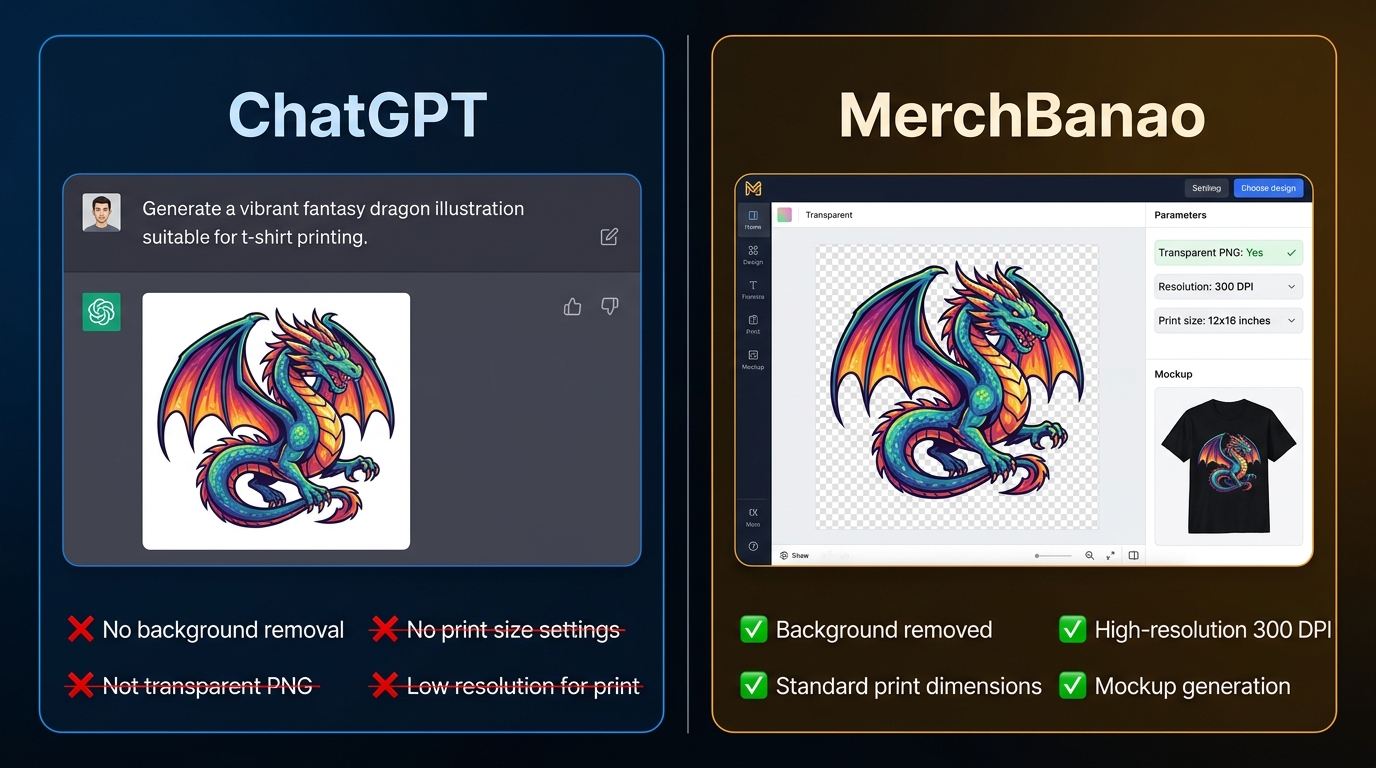
Use ChatGPT when conversation and quick visual revisions are the main advantage. Use a design editor for precise type, layers, sizing, and export. MerchBanao provides that narrower finishing path with separate text and image layers, background removal, a shirt preview, and a fixed 4200 × 4800 PNG export.
#Write a Prompt for the Shirt, Not Just the Picture
OpenAI recommends a short, clear brief that covers the purpose, audience, subject, composition, style, colors, and constraints. For a shirt, also describe the printable shape: a centered badge, a compact chest graphic, a tall back print, or a one-color illustration. Ask for an original, generic treatment instead of copying a named artist, brand, character, or existing artwork.
A useful starting prompt is: "Create an original two-color camping badge for a dark T-shirt. Center a small tent beneath three pine trees and a crescent moon. Use bold screen-print-style shapes, generous negative space, no gradients, no mockup, and no text."
Change one thing at a time after the first result. For example: "Keep the composition and colors. Make the tent 20% larger and simplify the tree branches." For more starting structures, use the tested T-shirt prompt library.
- Purpose and audience: a readable front graphic for adult hiking-club members
- Subject and action: one tent beneath three pines, viewed straight on
- Composition: centered badge with a clear silhouette and open space around it
- Style and palette: original block-print look in cream and rust
- Production constraints: no photo, no garment mockup, no tiny details, no gradients
- Revision instruction: name what changes and what must remain unchanged
#Treat Generated Lettering as a Proof, Not Final Type
Keep generated wording short. Put the exact phrase in quotation marks and specify its capitalization, placement, approximate weight, color, and whether any other text is allowed. OpenAI's guide also recommends reviewing every word and finishing production-critical typography in a design tool when needed.
For example: "Add only the words 'TAKE THE LONG WAY' in uppercase cream block lettering, centered above the tent. Do not include any other letters or numbers." Zoom in after every revision. Look for substituted characters, doubled letters, stray marks, and warped baselines.
If the wording matters, the safer workflow is to generate the illustration without text and add the phrase as an editable layer. MerchBanao has 50 fonts and separate controls for text size, color, position, scale, and rotation.
#Check Transparency, Pixels, and the Product Template
Do not assume that asking for a “transparent 300 DPI PNG” makes the result transparent or correctly sized. OpenAI's current image-generation API guide says the gpt-image-2 API model does not support transparent backgrounds. Product behavior can change, but a separate background-removal and edge-inspection step is still the dependable workflow.
DPI metadata is not extra detail. Divide the image's pixel dimensions by the intended print size in inches to find its effective pixels per inch. Then compare both the dimensions and aspect ratio with the provider's template for that exact garment and print area.
MerchBanao downloads a 4200 × 4800 transparent PNG after editing and background removal. That maps to 14 × 16 inches at 300 pixels per inch, but it is not a universal product preset. The print-ready file guide explains the pixel math and the checks to run before upload.
#A Practical ChatGPT-to-Print Workflow
Start with a specific audience problem or visual direction, not an unsupported request for a “trending, low-competition niche.” ChatGPT can organize ideas, but it cannot replace current marketplace research. Check live search results, listing quality, review concentration, and product fit before making the design.
Generate a simple visual draft, revise the composition, and then move the chosen image into an editor. Rebuild important wording as editable text, remove the background, inspect the silhouette on both light and dark shirt previews, and export at the dimensions required by the product.
Before publishing, inspect the file at full size and at realistic chest size. Then order a sample when color, edge quality, placement, or a new supplier matters. Use the print-on-demand sample checklist to review the physical result.
- Validate the audience and product using current marketplace evidence
- Write one original design brief with a clear composition and limited palette
- Generate a draft and make small, targeted revisions
- Move final wording into editable text layers and proofread it
- Remove the background and inspect edges on light and dark previews
- Match actual pixels and aspect ratio to the provider's product template
- Check rights, upload a private proof, and inspect a physical sample when warranted
#Check Rights Before You List the Design
An AI-generated result is not automatic proof that a slogan, character, logo, or visual treatment is safe to sell. Avoid prompts that imitate living artists or reproduce protected brands and characters. Search the exact phrase, inspect similar marks in the relevant product category, keep your prompts and source records, and read the rules of the marketplace and image tool you use.
OpenAI's usage policies govern what you can create with its services. Marketplace listing rules and intellectual-property law are separate checks; one does not replace another.
The T-shirt copyright and trademark guide gives you a repeatable pre-publish review. It is a screening workflow, not legal advice or a guarantee of clearance.
How It Works
A browser workflow for an artwork draft
Prompt it
Describe your vision in text.
Refine it
Tweak colors, layout and text.
Export and check
Download a 4200 × 4800 PNG, then check the product template.
Frequently Asked Questions
Everything you need to know about chatgpt t-shirt design
Related Tools & Guides
Everything you need to design, launch & sell
Print-Ready AI Designs
Pixel math and product-specific file checks
Best AI for T-Shirt Design
Ideogram, FLUX, Midjourney vs MerchBanao
Best AI Image Generator for T-Shirts
Why merch needs more than an image generator
AI T-Shirt Design Ideas
Niche concepts and prompts for POD selling
How to Design a T-Shirt with AI
Step-by-step guide from prompt to POD
Ready to turn this guide into
a print-ready design?
Generate, edit, remove the background, and check the artwork before print