Amazon Merch Content and IP Policy for AI Designs
The short answer: Amazon Merch on Demand does not currently publish a separate rule that specifically allows or bans AI-generated designs. AI-assisted work still has to pass the same intellectual-property, copycat, content, metadata, and quality checks as any other submission.
That distinction matters. "Amazon has no separate AI rule" is not the same as "anything made with AI is allowed." The creator remains responsible for what appears in the artwork, title, brand name, bullet points, and description.
This guide is based on Amazon's official public Merch on Demand Content Policies, intellectual-property FAQ, and product-quality guide reviewed on July 31, 2026. MerchBanao is not Amazon, and this article is practical publishing guidance rather than an official Amazon statement or legal advice.
The Amazon Merch AI Policy in Plain English
Amazon's current Merch on Demand Content Policies list three broad groups of prohibited content:
- Illegal or infringing content
- Offensive or controversial content
- Other content that can create a poor customer experience
The page does not mention "AI," "generative AI," or an AI disclosure field. Amazon's separate intellectual-property FAQ puts responsibility on the creator to hold the necessary rights. That responsibility covers the design and the product name, description, bullets, keywords, and brand name.
For an AI-assisted workflow, the safest reading is simple: judge the output, not the tool that produced it.
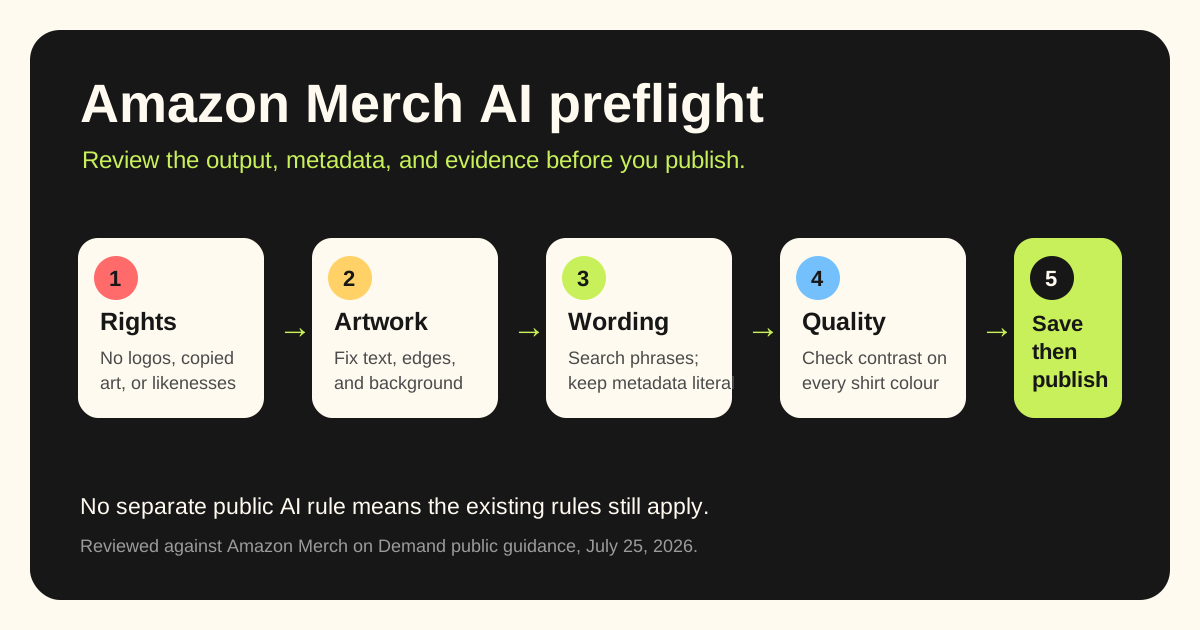
Five Checks to Run Before You Publish
1. Check the artwork for protected material
Do not upload an image simply because the generator produced it. Look for:
- Brand logos, packaging, or recognisable trade dress
- Film, game, comic, or television characters
- Sports-team names, crests, mascots, or uniform details
- Celebrity names, faces, signatures, or catchphrases
- Album covers, lyrics, book illustrations, or copied poster layouts
- A close reproduction of another seller's original artwork
Amazon says content creators should either own the relevant rights or have permission to use third-party intellectual property. Its FAQ also defines copycat designs to include full or partial reproductions, recoloured reproductions, and copies containing distinctive design elements.
Prompts such as "make this exact bestseller in a different colour" create obvious risk. A safer prompt describes the audience, subject, visual era, composition, and mood without naming a living artist, brand, franchise, or existing listing.
2. Search the words, not just the image
A visually original design can still fail because of a protected phrase. Search the exact wording before publishing, especially when the phrase functions like a brand slogan.
Amazon's content-policy page links to the official USPTO trademark search resources for the United States and equivalent registries for other marketplaces. Search the countries where your listing will be available, then consider whether the phrase is protected for apparel or related goods.
A database search is a screening step, not a legal opinion. If a phrase is central to a commercial launch and the result is unclear, speak to a qualified attorney.
The broader T-shirt copyright and trademark guide covers federal and common-law searches, asset licences, quotes, public-domain material, and seller records.
3. Audit every listing field
Amazon reviews more than the PNG. Its FAQ tells rejected creators to check the design, brand name, title, description, and bullet points.
The Guide to Merch Product Quality says metadata must match the design. It specifically warns against unrelated gift language, promotional phrases such as "best seller," and claims such as "100% quality guaranteed." It also prohibits metadata written to manipulate search results.
Use a title that describes the design a buyer can see. Keep bullets relevant to the theme or artwork. Do not stuff a list of loosely related niches into the description.
4. Inspect print quality at full size
AI output often looks convincing in a small preview while hiding defects in lettering, hands, borders, or repeated details. Amazon's quality guide calls out:
- Typos
- Blurry or low-resolution images
- Unclean backgrounds
- Watermarks
- Illegible designs caused by artwork and shirt colours blending together
Zoom to 100%, read every letter, and place the artwork on each selected garment colour. If the design relies on fake glitter, foil, metallic ink, or a textured material, revise it. Amazon says content should not imply a special printing effect or physical texture that the printed product does not have.
For production setup, use the Merch by Amazon design guide and verify the current template inside your Merch account before export.
5. Keep a simple creation record
Save enough information to reconstruct how the design was made:
| Record | Why keep it |
|---|---|
| Original prompt | Shows the concept you asked for |
| Generation date and tool | Connects the output to the applicable tool terms |
| Raw output | Preserves the unedited starting point |
| Edit history or layered file | Shows human changes and production work |
| Final PNG | Identifies the exact submitted artwork |
| Licence or terms snapshot | Records the commercial-use terms at creation time |
| Trademark search notes | Shows what phrases and markets you checked |
This folder is not a shield against rejection. It is simply good operational hygiene when you publish a large catalogue or work with contractors.
What Copyright Guidance Adds
Marketplace acceptance and copyright protection are different questions.
The U.S. Copyright Office's Copyright and Artificial Intelligence initiative says its January 2025 report addresses the copyrightability of generative-AI outputs. The practical issue is human authorship: prompting alone may not give you copyright in every generated element, while human selection, arrangement, drawing, lettering, and editing may be protectable when they meet the usual standard.
This does not mean an AI output is free of infringement risk. A work can be difficult for you to protect and still reproduce protected material belonging to someone else.
Build meaningful human decisions into the finished piece. Rewrite the copy, redraw weak elements, choose the composition, create the typography, and document the edits. Do it because the design becomes better and more defensible, not because a token edit guarantees a legal result.
A Safer AI-to-Amazon Workflow
- Start with a niche and customer, not an existing bestseller.
- Write an original prompt with subject, composition, palette, and print constraints.
- Generate several directions with an AI T-shirt design generator.
- Reject outputs with recognisable IP, garbled text, watermarks, or suspiciously familiar layouts.
- Add human typography and edit the composition.
- Search the final phrase in relevant trademark databases.
- Test contrast on every garment colour.
- Write literal, design-relevant metadata.
- Save the creation record.
- Re-read the live Amazon policy before submitting a batch.
What to Do After a Rejection
Read the rejection reason before changing anything. Compare the artwork and every listing field with Amazon's content policy and quality guide. Removing a risky keyword will not fix copied artwork; redrawing the art will not fix prohibited metadata.
Do not repeatedly resubmit the same questionable design with tiny changes. Amazon's FAQ says repeated policy violations can lead to suspension or termination. When the reason is unclear, use the support route in the Merch portal and keep your question factual.
Final Checklist
Before clicking Publish, confirm:
- The artwork does not copy a character, logo, celebrity, artist, or competitor listing.
- You checked the final words and phrases for trademark risk.
- The title, brand, bullets, and description match the visible design.
- There are no typos, watermarks, blurred edges, or hidden background pixels.
- The art is legible on every selected shirt colour.
- The listing makes no false claims about glitter, foil, texture, fulfilment, or popularity.
- You saved your prompt, source output, edits, final file, and tool terms.
- You checked the current Amazon policy rather than relying on an old forum post.
AI can speed up ideation. It does not move responsibility away from the seller. A careful review is slower than a one-click upload, but much faster than rebuilding a suspended catalogue.