T-Shirt Printing Methods: Which One Fits Your Design?
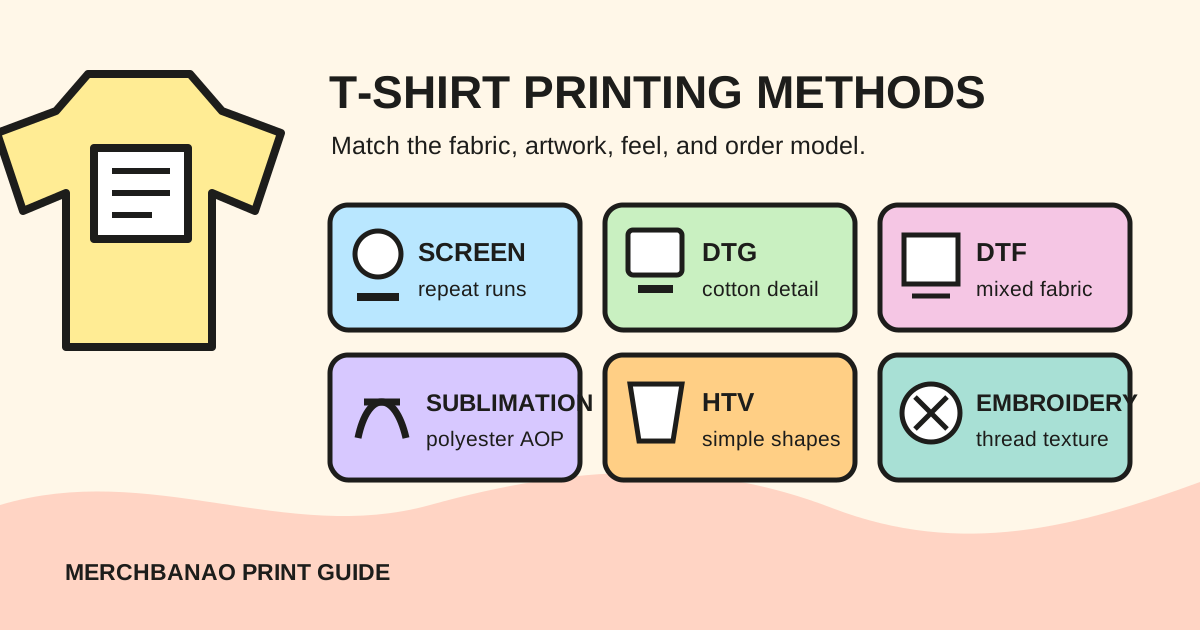
The main t-shirt printing methods are screen printing, direct-to-garment (DTG), direct-to-film (DTF), dye sublimation, heat-transfer vinyl (HTV), and embroidery. The right choice depends on the shirt fabric, artwork, placement, order model, and how the finished surface should feel.
Start with those constraints. Choosing a method first and forcing the product to fit it is how a soft cotton tee ends up wearing like a placard.
Quick decision
- Detailed one-off on cotton: compare DTG.
- Mixed fabrics or transfers prepared ahead: compare DTF.
- Repeat run with separable colours: quote screen printing.
- Light polyester or all-over sportswear: use the supported sublimation product.
- Simple names, numbers, or shapes: consider HTV.
- Small textured mark on a stable garment: consider embroidery.
No row is a guarantee. The provider, equipment, consumables, blank, and operator can change the result within the same method.
T-shirt printing methods compared
Printful's current comparison of seven shirt-printing methods uses fabric compatibility, design flexibility, and use case as the core distinctions. Those are more useful than generic claims about which process is “highest quality.”
| Method | Strong fit | Main limitation | Typical artwork preparation |
|---|---|---|---|
| Screen printing | Repeat runs, bold separable artwork | A screen and setup for each colour | Vector or high-resolution art with colour separations |
| DTG | Detailed, multi-colour work on cotton-rich garments | Fabric compatibility and pretreatment matter | Product-sized raster file, commonly transparent PNG |
| DTF | Detailed transfers across cotton, polyester, and many blends | Transfer layer, powder, curing, and pressing | Product-sized raster file prepared for the transfer workflow |
| Sublimation | Light polyester and all-over printed garments | Standard dye sublimation does not belong on ordinary cotton | Full product template with bleed and safe areas |
| HTV | Names, numbers, logos, and simple spot-colour shapes | Weeding and layering become awkward with detail | Clean vector paths or cut-ready shapes |
| Embroidery | Small logos, monograms, hats, polos, and heavier garments | Tiny text, gradients, and photographic detail translate poorly | Simplified artwork that can be digitised into stitches |
The “typical file” column is deliberately broad. Always open the file requirements for the exact product and placement.
Choose the blank before the printing method
Fabric is the first hard constraint.
- Cotton and cotton-rich garments suit DTG because the water-based ink can absorb into the fibres.
- DTF works across a wider set of cotton, polyester, fleece, nylon, and blended products, subject to the provider's catalogue.
- Standard dye sublimation requires polyester or a poly-coated surface.
- Screen printing can work on several fabrics, but the shop must match ink, additives, curing, and garment behaviour.
- Embroidery needs enough structure to support stitches without excessive puckering or distortion.
Garment colour matters too. Dark DTG products commonly use pretreatment and a white underbase. DTF carries a white layer in the transfer. Sublimation is usually paired with white or light polyester because the dye is transparent; it does not print an opaque white base.
If a catalogue offers the same shirt in ten colours, do not assume every colour uses the same decoration method. Check each variant.
1. Screen printing
Screen printing pushes ink through open areas of a mesh stencil. Each colour normally has its own screen, and the printer registers the layers so they align on the garment.
That setup explains its economics. Once the screens are prepared, repeating the same artwork is efficient. A one-off six-colour illustration carries the same separation and setup problem without a long run to spread it across.
Screen printing is a good candidate for:
- bold logos, type, mascots, and spot-colour illustrations;
- repeat event, team, staff, or merchandise runs;
- designs that need a specific ink treatment unavailable through a POD catalogue;
- garments and placements a chosen screen-print shop has already tested.
It is less convenient for rapidly changing personalisation, photographic artwork with many tones, and frequent one-piece tests. Halftones can simulate shading, but that is a deliberate separation job, not an automatic “save as screen print” button.
Ask the shop for its preferred vector format, colour-separation rules, spot-colour references, minimum printable detail, underbase policy, and maximum print area. Pantone matching may be available, but it needs to be specified and sampled.
2. Direct-to-garment (DTG)
DTG jets water-based ink directly onto a garment and cures the print. Printful's DTG process documentation describes loading the garment on a platen, applying pretreatment, printing the artwork, and curing the ink.
It is a natural fit for one-off or short-run cotton apparel with:
- many colours or smooth gradients;
- illustration and photographic detail;
- variable designs that would otherwise require new screens;
- artwork where a soft, breathable result matters.
The garment is not a neutral sheet of paper. Cotton composition, knit, pretreatment, shirt colour, ink coverage, and curing affect colour and feel. A pale, low-opacity detail can behave differently on black than it does on white.
Use the target product's template and resolution guidance. Do not enlarge a small web image and trust a “300 DPI” label; pixels at final physical size determine usable raster detail.
3. Direct-to-film (DTF)
DTF prints colour and white ink onto transfer film. Adhesive powder is applied and cured, then a heat press bonds the design to the garment.
Its practical advantage is fabric range. Printful's DTF overview lists cotton, polyester, and blends, while Epson's DTF Film Printing Guide documents the film, powder, heat-transfer, peeling, and finishing stages.
The trade-off is the transfer layer. Large solid blocks can feel heavier than DTG on cotton, and production has more opportunities for powder, curing, pressure, alignment, or peeling errors. Temperature and time are not universal. Epson says they vary with the film, powder, ink load, equipment, and fabric.
Use DTF when that wider material compatibility or separate transfer workflow solves a real production problem. For a deeper process and file-preparation walkthrough, read what DTF printing means.
4. Dye sublimation and all-over print
Sublimation uses heat to transfer dye into compatible material rather than leaving an opaque layer on top. Sawgrass describes standard sublimation as a process for polyester fabric and poly-coated products.
That makes it particularly useful for:
- polyester sports jerseys and performance apparel;
- seam-to-seam patterns produced through a supported cut-and-sew workflow;
- light products where the garment can supply the white areas;
- designs that should remain smooth because the colour is in the material.
It is a bad match for an ordinary dark cotton tee. There is no standard white sublimation ink hiding beneath the artwork, and cotton does not accept conventional polyester sublimation dye in the same way.
All-over print also changes the design job. You are composing across front, back, sleeves, and seam allowances, not dropping one square image in the middle. Use the provider's complete template, extend backgrounds through bleed areas, and keep critical text and faces away from seams. The all-over-print design guide covers that workflow.
5. Heat-transfer vinyl (HTV)
HTV starts as coloured vinyl. A cutter traces the design, unwanted material is weeded away, and heat presses the remaining shape onto the shirt.
It makes sense for clean text, names, numbers, small logos, and short personalised runs. A local shop can change a surname or jersey number without rebuilding screens. Specialty films also offer finishes that ink does not mimic exactly.
Complexity becomes physical work. Every tiny island must survive cutting and weeding, and multi-colour artwork may require separate layers and careful alignment. A photograph is the wrong starting point.
Prepare smooth vector paths, remove duplicate shapes, expand fonts when the shop requests it, and check the minimum cut size for that film and cutter. Large solid areas may feel less breathable, so keep the coverage intentional.
6. Embroidery
Embroidery is technically stitching, not printing, but buyers compare it with printed decoration on the same product page. It brings real texture and works well for a compact chest mark, monogram, cap badge, polo, jacket, or sweatshirt.
The artwork must become stitches. Printful's embroidery-file guidance explains digitisation and warns about tiny text, thin lines, distressed graphics, gradients, photographic images, and large solid backgrounds. It recommends using the exact embroidery area template; its standard guidance sets text at least 0.25 inches high and regular satin-stitch lines at least 0.05 inches thick.
Those figures are Printful-specific, not universal embroidery law. Another shop may use different machines, thread, backing, needles, digitisation, and garment structure.
Simplify the design before handing it to a digitiser:
- reduce tiny enclosed spaces;
- replace gradients with deliberate thread colours or stitch direction;
- remove faux texture that would become random isolated stitches;
- check how the backing and stitch density feel against the intended garment.
An embroidered version of a logo is often a redesign, not a file conversion.
How to choose a t-shirt printing method
Use this order:
- Fix the product. Record fabric composition, weight, colour, size range, and supported placements.
- Classify the artwork. Count colours, note gradients, transparency, tiny type, variable names, and total ink or stitch coverage.
- Define the order model. One-off POD, short personalised run, repeat bulk run, or local production need different setup economics.
- Decide on feel. Soft absorbed ink, smooth dyed polyester, a surface transfer, raised screen ink, vinyl, and thread are visibly and physically different.
- Get method-specific quotes. Include setup, digitisation, sampling, shipping, rejected pieces, and reprints.
- Order comparable samples. Use the same or closely matched blank, artwork size, and garment colour where possible.
The shop that answers those questions clearly is usually a better bet than the one that declares its favourite machine “best.”
Prepare one editable master, then method-specific files
Keep the original artwork layered and editable. From that master:
| Output | Preparation focus |
|---|---|
| DTG | Final-size raster detail, deliberate transparency, garment-colour preview |
| DTF | Final-size raster detail, clean transparent edges, transfer-safe fine detail |
| Screen printing | Separable colours, vector edges where appropriate, agreed spot colours |
| Sublimation | Full product template, bleed, seam-safe placement, polyester colour assumptions |
| HTV | Closed cut paths, weedable islands, sensible layer count |
| Embroidery | Simplified shapes, stitch-ready spacing, digitisation and backing |
MerchBanao's AI t-shirt design generator can generate artwork, remove a background, adjust composition, preview a mockup, and export a 4200 × 4800 PNG. That is a useful raster master for some workflows. It does not automatically create screen separations, cut paths, an all-over product template, or an embroidery file.
Use the print-ready t-shirt design guide to calculate pixels at the final size. Then follow the printer's method-specific instructions.
What to check on a sample
Look past the mockup:
- Is the placement straight and consistent?
- Did small positive lines fill in or break?
- Did negative spaces close?
- Does the print feel comfortable at the chosen coverage?
- Is the garment colour affecting the artwork?
- Are seams, collars, pockets, or zips distorting the placement?
- Does the design stretch and recover as expected?
- After washing according to the care label, did colour, adhesion, shape, or hand feel change?
Take photos before and after washing in the same light. One sample does not prove lifetime durability, but it can expose a bad blank-method-artwork combination before customers do.
Pick the method from the product backwards
The best t-shirt printing method is the one that reproduces your artwork on the chosen garment, at the required quantity and feel, with a process you can test and repeat.
For cotton one-offs, start by sampling DTG. For a mixed-fabric catalogue, compare DTF. Quote screen printing for a stable repeat run. Use sublimation for a compatible polyester or all-over product, HTV for simple personalisation, and embroidery when thread is part of the design rather than a substitute for ink.